You need to be able to test an application in the same way that a user would use it... and despite the apparent disadvantages compared with unit testing, integration testing is a necessary part of a balanced QA plan for maintaining product robustness.
Sure, unit tests are great for checking the individual components of a system, but what if your system relies on many different components working together in unison? In cases where unit tests just won't see the big picture, that’s where integration testing comes in. When you're dealing with web apps, this may include a cross-browser examination of user-facing functionality for usages like site navigation, pressing buttons, filling in forms, and so on. Selenium is an excellent solution for handling this, and one that's worked particularly well for us.
At HubSpot we maintain a continuous deployment environment in which new features are pushed to production all the time. Automated browser-based regression testing with Selenium and the WebDriver API helps to ensure that our code changes don't break the builds. Multiple programming languages are supported for use with Selenium, so once the framework was installed, we chose Python for writing our tests in.
Once the tests get written and committed to GitHub, our continuous integration server (Jenkins) picks up the tests and runs them at regular intervals. In order to run the tests, Jenkins accesses the Selenium Grid Hub, which manages our available web browsers that live on Amazon EC2 instances in the cloud. If there are any errors at runtime, it becomes really easy to track down problems because screenshots get saved along with error output. Jenkins then sends us email notifications so that we can be alerted of any issues right away.
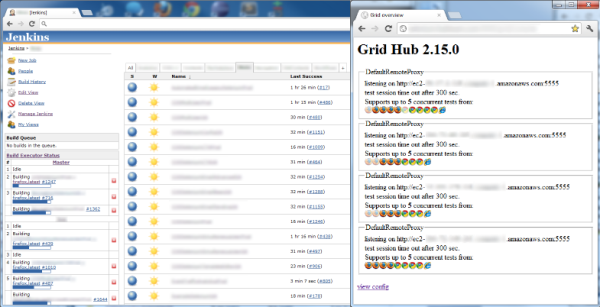
(Above/left - Generic example of Jenkins in action. You can see which jobs are building and their status.)
(Above/right - Generic example of Grid Hub in action. You can see the status of machines and which browsers are running Selenium tests.)
Here, we have both a QA and a Production development environment. As new features get pushed to QA to be tested before reaching Production, a post-deploy script instantly kicks off the associated Jenkins jobs so that we can determine if anything broke. This also becomes a good time to write new Selenium tests for features being added. If all tests pass (not just Selenium, but also all our unit tests, etc), then it’s safe to deploy code to Production.
One weakness of Selenium is that changes to the UI can break tests even if there’s no regression because Selenium performs checks based on the CSS selectors of the web page being tested. That’s why failures don’t necessarily mean something broke. To avoid these false positives, tests may need to be updated as changes to the application code occur. With good planning during test creation, you can write tests that are more adaptable to the visual changes in an app so that tests stay robust during code pushes. There may be a tradeoff between test quality and speed of test creation. Quality is generally the better path to take in the long run.
We use a MySQL DB to store a lot of the data that we gather from Selenium test runs so that we can run queries against tables later for figuring out patterns and other useful information. The tests also access the DB where needed. For example, let's say there's a test for checking that emails get sent out at the start of the next business day. Rather than having a test running for that long, the test stores the subject of the email in the DB and when the test runs again the next day it checks if an email with that subject was received by the given email address. In other cases where the wait time required is much smaller (e.g., 20 minutes) we can still use our delayed test system for keeping our servers available for other tests during the waiting period.
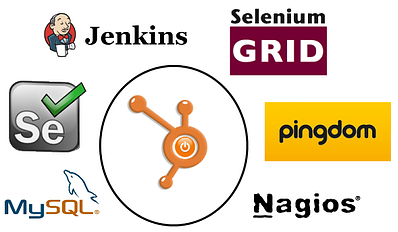
(Above - A quick look at some of the tools we use for testing.)
With all of its adaptability and functionality, Selenium has proven itself to be a powerful solution for integration testing. We also use several other tools and services for testing our applications, including Pingdom, Sentry, Nagios, and more (some internally made); not to mention all those unit tests we have everywhere.
Testing is a big deal, and that's no exception at HubSpot. It’s vital for us to keep our applications robust because we're not in the business of forcing our customers to be involuntary beta testers. With multiple apps contributing to HubSpot’s integrated marketing solution, there’s no shortage of testing to be done, and it’s one of the ways we try to give our customers the best user experience possible.


(Michael Mintz leads the Selenium Automation at HubSpot)


Alex Cook 9:51 PM on October 19, 2012
Hey Michael - nice post and thanks for putting it together. Looks like there's some configuration investment, specifically getting ec2 instances setup taking screen shots/etc...
What's your take on using a service like this one? Did you look at anything like it?
https://saucelabs.com/home
Michael Mintz 12:54 PM on October 31, 2012
Hi Alex - there's some initial configuration investment, but it's really simple. To capture screenshots, all you need to do is create a plugin for use with Selenium WebDriver. In the following simple python-based example, start with the import shown below:
"from nose.plugins import Plugin"
Then you create your class, eg: "class ScreenShots(Plugin):"
and inside the class you can create a method that saves a screenshot from your Selenium WebDriver test run for your error logs with the following WebDriver command: "driver.get_screenshot_as_file(screenshot_file)"
...And that should take of the screenshots.
As for the EC2 instances, that's also easy to setup.
http://aws.amazon.com/ec2/pricing/
Let's say you want to do A LOT of automated testing. A single High-CPU Medium On-Demand Instance will cost $205.20 for a month of non-stop usage on a Windows machine ($0.285/hour * 24 hours * 30 days)
With that much power, you can probably run at least 5 tests at the same time non-stop for a month. That's 216,000 minutes of monthly testing (5 tests * 60 minutes * 24 hours * 30 days). So if each test takes a minute to run, and you want to run each test every 30 minutes, you can run a total of 150 integration tests every half hour (5 per minute * 30 minutes). This also takes into account the running of your Jenkins instance, your Selenium Grid Hub, etc. If you have fewer tests to run, you may be able to get away with using just a Standard Small EC2 on-demand instance ($82.80 per month) running at least 43,200 testing minutes per month (if at least one test is always running). You may be able to get your EC2 machines to handle more than the specified number of minutes above, but that's just a general example, which is based on memory usage and other factors.
I took a look at services for use with Selenium (such as Sauce Labs) and have determined that in-house infrastructure is the best way to go for our Selenium needs. That gives us full control over all our automated testing environments with Selenium and WebDriver. At any time we can log-in to our EC2 machines, see what's going on, and make changes as necessary.
In similar fashion to the screenshot plugin described above, we've created several other plugins for our Selenium WebDriver test framework, for example, the database plugin for the MySQL DB that I discussed in my blog post. These plugins (combined with the rest of our test framework) give us all the flexibility and power that we need for a robust integrated test automation system that helps play a key role in identifying issues that may be present. If Jenkins reports that a test has failed, the logs contain all the data that we need to take action (but usually all I need is the last screenshot along with the line of code that failed). And if you want instant alerts on your phone for failures, you can just tell Jenkins to send emails to your PagerDuty account: http://www.pagerduty.com/ so that you can be alerted anytime, anywhere, when something breaks.
Alex 3:07 PM on January 31, 2013
Michael: I think I've thanked you elsewhere, but thanks for putting all this together. It's been over 4 months and I still haven't taken the time to set this up. I'm thinking about finding a SaaS product. We're a pretty small, resourced constrained team... the idea of setting up an ec2 instance, all the necessary browsers, Selenium, automated reporting... sounds like a huge time sink. I'm going to check out these guys: http://testingbot.com This seems like a really solid opportunity for a SaaS startup... maybe you should get in the game? :) It sounds like you're full time at HubSpot running and managing automated testing. In house makes sense, I think, for someone as large as Hubspot. But for a small team, this seems like the type of problem that should be outsourced, so the founders can focus on driving the business. What kind of maintenance time would you say you're putting into your ec2 instances?
Michael Mintz 10:16 PM on January 31, 2013
Hi Alex. Excellent points. The maintenance time for EC2 instances is minimal. Once they're running, they'll pretty much stay running. If a machine ever gets rebooted, a simple script can start everything back up on its own during start-up (which is mainly just opening the connection to the Selenium grid through the command prompt automatically). Once you create and setup your Selenium EC2 instance the first time, you can save the machine configuration as an EC2 image which can then be used at anytime to spin up more identical instances after that. As for getting into the test framework game you mentioned, that's something that I've already thought about here. Since (as mentioned in the main article) we've already built a test framework that uses several powerful features for the full integration testing process (which is feature-comparable to what Selenium SaaS companies offer). From here, it wouldn't be too difficult to strip out our framework of methods that are specific to our site, and then convert the result of that into an open source test framework that can be used to test any site on the Internet. As an open source test framework, this has the potential to save money for anyone interested in using Selenium for their integration testing. There are other challenges involved with this. Maybe even legal challenges too. For instance, people could write a test that accidentally performs bad actions on their web site. For such reasons, it might have to be stated somewhere that people are fully liable for what they make their tests do while running those tests on their web site. It's an interesting project to think about. Stay tuned for more information.
shree 4:55 PM on May 08, 2013
Hi Alex, I'm trying to create a jenkins job which will connect to AWS (ubuntu with Firefox) and run the web driver test and put back the results to jenkins, pretty new to AWS world, any pointers will be of great help -Shree